

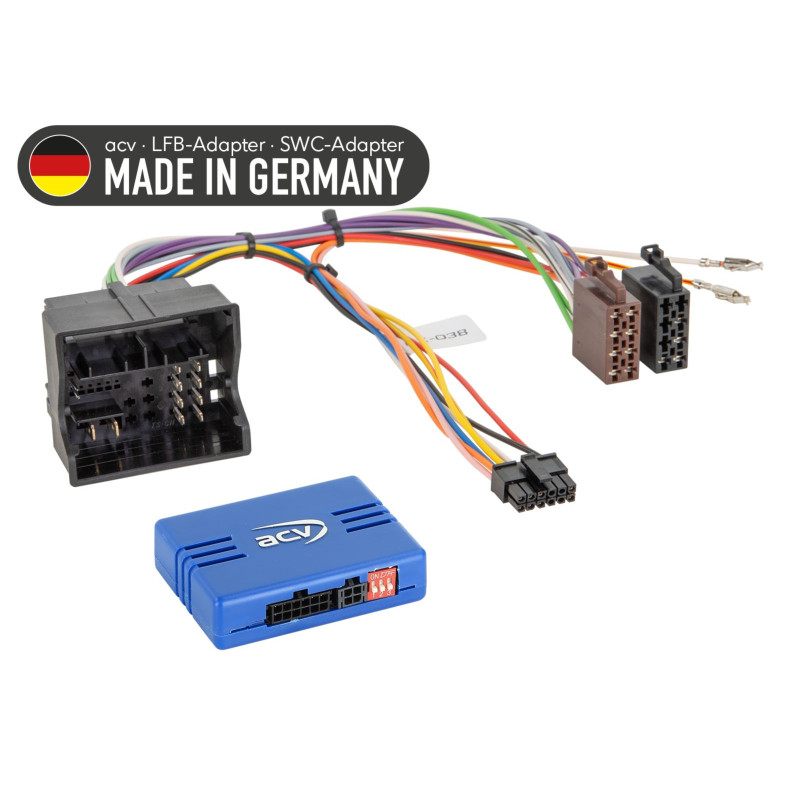

Steering wheel adapter for Audi/MAN/Seat/Skoda/VW various vehicles 52Pin Quadlock
Steering wheel adapter for Audi/MAN/Seat/Skoda/VW various vehicles 52Pin Quadlock
Guarantee
12 month
Delivery from Europe in
7 - 12
business days
Steering wheel adapter - Audi / Seat / Skoda / VW
The adapter allows you to retain the original steering wheel control functions when replacing the factory radio with a retrofitted head unit (HU). It enables integration with the CAN bus system without any loss of functionality.
Key features:
Maintaining full functionality of steering wheel controls.
Compatibility with MIB, MIB-PQ, OEM booster and non-booster systems.
Support for E-Call systems (while maintaining functions in MAN / Seat / Skoda / VW vehicles).
Support for OEM rear view camera adapter on MIB-PQ vehicles.
LED diagnostics: flashing blue - searching for CAN bus; solid blue - CAN bus active; red - +12V ignition current active.
Supported vehicles
The adapter fits a wide range of Audi, Seat, Skoda, VW, and MAN TGE models. Example vehicles:
Audi: A1 (2010-2018), A3 (2013-2020), Q3 (2011-2018)
Seat: Alhambra, Arona, Ateca, Ibiza, Leon, Mii, Toledo (various years 2015-2021)
Skoda: Citigo, Fabia, Karoq, Kodiaq, Octavia, Rapid, Superb, Yeti (2014-2021)
VW: Amarok, Arteon, Beetle, Caddy, Crafter, Golf VII, Passat B8, Polo, Scirocco, Sharan, T6, T-Roc, Taigo, Tiguan II, Touran, UP!, e-UP! (various years 2014-2024)
MAN: TGE (2017-2024)
(Note: For a complete list of supported models and years, please refer to the manufacturer's documentation.)
Signals and connectors:
Pink wire: +12V ignition terminal (15), max. 1.5A.
Orange wire: +12V lighting terminal (58), max. 0.1A.
Reverse gear signal (only when engine is running).
Connectors compatible with systems from various manufacturers: Alpine, Blaupunkt, Clarion, Digital Dynamics, ESX, JVC, Kenwood, Pioneer, Snooper, Sony, XZent, Zenec.
Installation instructions:
Verification before installation:
Compare the adapter connectors to the connectors in your vehicle.
Check if one of the supported HU head units is installed in your vehicle.
Check vehicle functionality and settings.
Connecting:
Disconnect the OEM HU from the power supply.
Check the configuration and settings of the interface without voltage.
Connect the HU connection cable according to the instructions of the new HU.
Connect the remaining adapter wires.
Connect the main connector last.
Configure the interface software and retrofit HU.
Test steering wheel controls, rearview camera, and other vehicle features.
Configuration changes: