

-
−14%



Guarantee
36 month
Delivery from Lithuania in
3 - 5
business days
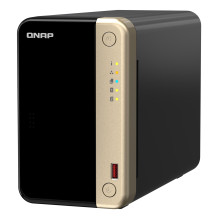
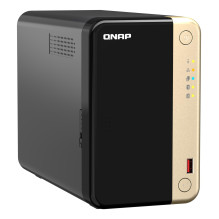
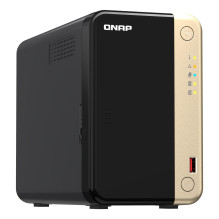
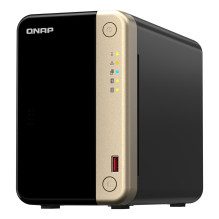
Система зберігання даних QNAP TS-264-8G
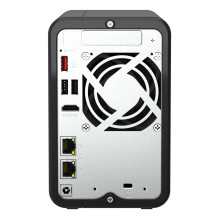
Powered by an Intel® Celeron® N5105/N5095, quad-core processor (burst up to 2.9GHz), the TS-264 features two 2.5GbE RJ45 ports and Port Trunking for up to 5Gbps combined bandwidth. With M.2 PCIe Gen3 and PCIe Gen 3 slots, the TS-264 provides flexibility in extending NAS functionality, allowing you to install a QM2 card for M.2 SSD caching, or Edge TPU for AI image recognition and various 10GbE/5GbE network cards. The TS-264 comes with 8 GB RAM for running light VMs and Containers, and supports multi-cloud backup, cloud storage gateways, 4K HDMI output and real-time transcoding, alongside expandable storage capacity and feature-rich apps to perform as a cost-efficient, reliable 2.5GbE NAS.
2.5GbE connectivity
Up to 5 Gbps transfer speeds can be achieved by setting port trunking with the two built-in 2.5GbE (2.5G/1G/100M) ports.
M.2 SSD caching
Dual M.2 PCIe Gen 3 slots enable NVMe SSD caching or SSD storage pools for improved performance, or Edge TPU for AI image recognition.
PCIe expandability
Install a PCIe Gen3 x2 card to expand the core functionality of the TS-264, including a Multi-Gig 10GbE/5GbE/2.5GbE network card, a QM2 card, or a USB 3.2 Gen 2 (10Gbps) card.
License-free virtualized environment
Host multiple containerized apps to run a wide range of applications and services.
Drives Auto-Tiering
Qtier™ auto-tiering technology and SSD caching enable constant storage optimization.
4K HDMI
4K H.264 hardware decoding and real-time transcoding for smooth big screen multimedia experience.
Quad-core high performance and up to 8 GB RAM
The TS-264 is powered by an Intel Celeron N5105 / N5095 quad-core processor and supports up to 8 GB DDR4 memory, two 2.5GbE ports and SATA 6 Gb/s drives. The integrated Intel® AES-NI encryption engine also helps protect confidential data without impacting system performance.
Accelerate AI-powered image recognition and caching with TPU and PCIe expansion
The TS-264 has two M.2 PCIe Gen3 slots, enabling SSD caching or SSD storage pools for improved performance, or Edge TPU for AI image recognition.
Install M.2 NVMe SSDs for cache acceleration or efficient tiered storage
The TS-264 supports SSD caching and features two M.2 slots that support M.2 PCIe NVMe SSDs
with 2280 form factors (sold separately) for boosting overall NAS performance. Qtier™ technology can also be used to empower the TS-264 with auto tiering that helps continuously optimize storage efficiency across all installed storage devices.
Accelerate AI-powered image recognition with TPU
By leveraging a Google Edge TPU to QNAP AI Core (the AI-powered engine for image recognition), the TS-264 can perform high-speed face and object recognition. Google Edge TPU enables QuMagie to quickly process thousands of photos with high-speed AI Image recognition and classification, and QVR Face to analyze real-time video for instant facial recognition.
SSD caching and auto-tiering enable 24/7 optimized storage efficiency
While SSD prices continue to fall, and SSD capacity and performance continue to increase, organizations can easily take advantage of SSD strengths. The TS-264 supports numerous SSD-aware features that significantly maximize NAS performance with high cost-effectiveness.
SSD over-provisioning
(Over-provisioning)
You can add additional SSD over-provisioning (1% ~60%) to avoid write amplification and improve SSD random write speeds and endurance. You can potentially attain enterprise-grade SSD performance levels from affordable consumer SSDs!
SSD cache acceleration
Enables SSD caching for increasing IOPS performance and reducing latency for storage volume. This feature is perfect for IOPS-demanding applications including databases and virtualization. The TS-264 also supports write-only cache to boost write-intensive applications.
Qtier for auto-tiering
Qtier technology drives auto-tiered storage with continuous data optimization across high-performance SSDs and high-capacity HDDs based on access frequency. I/O-Aware Qtier can reserve a cache-like space in the SSD tiered to handle burst I/O in real time.
Streamline large file transfers and video editing with 2.5GbE
The TS-264 comes with two 2.5GbE RJ45 (2.5G/1G/100M) LAN ports that allow you to use existing CAT5e cables to upgrade network speeds from 1 Gigabit to 2.5 Gigabit. The dual 2.5GbE ports also support Port Trunking for up to 5 Gbps transmission speeds, improving the efficiency of bandwidth-hungry business applications such as large file transfers, fast backup/restore, and multimedia transfer & editing.
Future-proof your IT infrastructure for high-speed networks
The TS-264 is ideally matched with QNAP's managed and unmanaged 2.5GbE/10GbE switches to form high-speed, secure, and scalable network environments without going over budget. QNAP also provide 2.5GbE/5GbE/10GbE PCIe cards and USB 5GbE adapters for Windows®/Linux® workstations, allowing you to easily build a high-speed network environment for productive team collaboration.
Enhance productivity with multiple USB ports
With two USB 3.2 Gen 2 (10Gbps) ports and two USB 2.0 (480Mbps) ports, you can quickly backup and transfer large files to/from the TS-264. UPS and other compatible USB devices can also be connected for greater functionality and application potential.
Abundant I/O capabilities with PCIe expansion
The TS-264 has one PCIe Gen 3 x2 slot that allow for installing various expansion cards for expanding application potential.
Direct 4K HDMI output for multimedia and virtual machine display
The TS-264 features Intel® UHD Graphics that supports dual-channel hardware decoding and real-time transcoding*. The HDMI 2.0 output supports up to 4K, providing great benefits for applications like video production/editing or industrial design that demands high resolution and color realism as well as intensive media storage, transfer, and display. By connecting the TS-264 to an HDMI display, you can directly watch multimedia content saved on the NAS, or use the TS-264 as a versatile workstation by directly outputting virtual machines from Virtualization Station or Ubuntu Linux Station.
Faster image identification with integrated Intel® OpenVINO™ AI engine.
With integrated Intel® OpenVINO™ AI computing resources, the TS-264 accelerates AI image recognition performance without impacting other applications or services. QNAP AI Core primarily works with the QuMagie application.
QuMagie photo management
Easy-to-use photo management solution that integrates AI image recognition and intelligent classification for your collection.
QTS 5, Fast, smooth, and easy-to-use!
The TS-264 comes with the QTS 5 operating system as standard, providing a next-generation usage experience with an updated system kernel, optimized user interface, and advanced security features.
Brighter. Smoother. You'll like it.
When navigating QTS 5, you will notice a finer attention to detail for a superior browsing experience. Enjoy a smoother NAS experience, comfortable visual design, and find your favorite apps quicker.
Get started with the notice board
When performing first-time installation, the notice board guides you through the setup process. Simply follow the step-by-step instructions for a quick and easy setup.
Smooth and reactive user interface
Whether clicking buttons, switching between apps, expanding/collapsing windows - every action is much smoother. The search bar in the main menu also assists in quickly finding desired apps.
Comprehensive backup and disaster recovery solution
The TS-264 supports various apps that cover all your backup needs. Practice safe IT habits by regularly backing up files and device content, allowing them to be easily restored when needed.
PC/Laptop backup
For Windows®, install NetBak Replicator to back up your PC to QNAP NAS. In macOS®, just set up the built-in Time Machine® to secure your data.
Remote backup for NAS
Hybrid Backup Sync makes it easy to back up data from a TS-264 to another QNAP NAS or remote server to fulfill your 3-2-1 backup strategy.
VM backup
Enjoy license-free VMware® and Hyper-V VM backup with source-side incremental backup, global deduplication, and recovery compression.
SaaS backup
Safeguard enterprise cloud data by backing up/syncing files, emails, calendars, and contacts from Google™ Workspace and Microsoft® Office 365® to the NAS.
Cloud backup for NAS
Hybrid Backup Sync supports mainstream cloud storage for NAS data backup. For backup to object cloud storage, VJBOD Cloud is especially useful to reduce bandwidth usage and backup time.
QuDedup technology
Hybrid Backup Sync eliminates redundant data at the source and then backs up the deduplicated data, helping to save time and storage costs while providing efficient multi-version backups.
Multi-version snapshots mitigate ransomware threats
The TS-264 supports block-based snapshots that record the state of the system at any time. It helps protect data, which can be restored back to a specific point of time, greatly helping in mitigating the threat of ransomware.
Volume and LUN snapshots
Take snapshots in seconds and revert the entire volume/LUN back to a specific point in time to prevent loss of important data.
Instantly restore snapshots
Snapshot content can be quickly restored to a local NAS, or restored on a folder/file basis to a local/remote NAS or cloud storage. You can also conveniently view and restore snapshots from the client side.
Back up snapshots
Multiply data protection by backing up snapshot files! Replicate volume/LUN snapshots in the TS-264 to a remote NAS (Snapshot Replica) by copying only the changes made. This helps save time & bandwidth, and can be run manually or on a scheduled basis.
All-in-one solution for hosting virtual machines and containers
By running multiple virtual machines and containers on the TS-264, you can deploy multi-tenant environments and applications to increase management efficiency and save hardware costs. Coupled with the Network & Virtual Switch app that boosts interoperability between virtual machines, containers, QNAP NAS, and other physical devices on the network, you can flexibly allocate physical and virtual network resources to simplify network deployment.
Virtualization Station
Run multiple Windows®, Linux®, UNIX®, Android™, and QuTScloud virtual machines and access them via a web browser or Virtual Network Computing (VNC). Businesses can run virtualized server applications on a single NAS without needing additional physical servers.
Conainer Station
Experience Docker®, LXD, and Kata Containers lightweight virtualization technologies, download apps from the built-in Docker Hub Registry®, import/export containers, and create abundant microservices.
Linux Station
Run Linux® applications (including apps from the Software Center) directly on the NAS and remotely access the Linux® desktop from a web browser. The open-source Linux® platform is also ideal for Internet of Things development.
Comprehensive security and privilege settings
The TS-264 is loaded with flexible privilege settings and security measures. Besides IP blocking, 2-step verification, HTTPS connection, there are more apps that help ensure optimal NAS protection against threats like malware and hackers.
myQNAPcloud secures remote access
myQNAPcloud allows convenient connection to the TS-264 through the Internet without any complex DDNS settings. To ensure your remote access service is secure, myQNAPcloud strengthens keys on SSL Certificates to 2048-bits.
Simplified privilege settings
The TS-264 supports comprehensive access right settings for shared folders, Azure Active Directory Domain Services (Azure AD DS), LDAP, and Windows ACL to help IT staff efficiently manage user accounts and access rights for multiple NAS systems.
QuFirewall protection
Supports IPv6, firewall access lists, and GeoIP filtering to restrict access based on geographical locations for higher NAS network security.
Superior security with QVPN
A virtual private network (VPN) allows secure access to network resources and services across public networks. QVPN supports creating a VPN client, using the TS-264 as a VPN server, and WireGuard® VPN service with an easy-to-use interface for setting up a secure connection.
QuWAN SD-WAN
To facilitate digital transformation, multi-site expansion and remote working, QuWAN SD-WAN helps automatically mesh multi-site VPN. It features IPsec encryption and cloud-centric management, allowing secure multi-site network including QNAP NAS and VMware ESXi platforms.
Security Counselor
A security portal for the TS-264 to check for weaknesses and offer recommendations for enhancing NAS security. It also integrates anti-virus and anti-malware scanning software.
Malware Remover
Regularly scan your TS-264 using the latest malware definitions. If infected files are detected, they will be immediately removed to ensure NAS data security.
The best file storage and collaboration center
The TS-264 integrates rich apps for storing, managing, synchronizing, searching, and archiving files. It supports SMB/CIFS, AFP, and NFS protocols for streamlined file sharing across Windows®, Mac®, and Linux®/UNIX®, and provides the smartest NAS solution for professionally managing your files.
File Station
Manage, access, and share all the files in the TS-264 and view snapshots files - all from your web browser. You can also easily mount remote NAS folders and cloud storage.
Qsync
Make any file uploaded to a TS-264 available to linked devices, such as computers, laptops and mobile devices. You can sync shared folders and team folders for group file sharing to enhance the flexibility of team projects and collaboration.
Qsirch
QNAP's powerful, Google-like search tool helps you quickly find images, music, videos, documents, and emails by keywords, color, and more search conditions. It also supports Qfiling to perform one-time or automatic archival tasks based on your search criteria.
Qfiling
Automate your file organization ─ all you need to do is categorize files, set a schedule, and Qfiling will do the rest. Qfiling also enables smart recycling that instantly moves filtered files to the Recycle Bin.
Smart surveillance solution for 24/7 security
QVR Elite is QNAP's subscription-based smart surveillance solution, allowing you to easily build a surveillance system with lower TCO and higher scalability. Recordings are saved as MP4 files, allowing playback on nearly every device. QVR Elite also integrates QNAP AI-based solutions to build smart facial recognition for retail and door access systems with QNAP NAS. You can arrange a dedicated, independent storage space for surveillance data on the TS-264 and enjoy simplified camera management, storage space allocation, camera live viewing and playback.
Flexible and economical storage expansion
QNAP provides easy ways to expand your storage capacity. Here are several ways to expand your TS-264 storage as needed to accommodate data and business growth.
Attach QNAP expansion enclosures
Connect expansion enclosures to the TS-264, and manage NAS storage expansion with the user-friendly Storage & Snapshots Manager app.
Mount cloud storage or remote file servers
Mount cloud storage or remote file servers to expand the capacity of the TS-264 while also centrally managing files on the NAS, cloud storage, and remote devices.
Migrate to a new NAS
Install your NAS hard drives into a larger QNAP NAS and retain all your existing data and configurations.
Upgrade RAID capacity
Hot-swap lower-capacity drives with larger-capacity drives to expand your NAS capacity so it can grow with your business.
More productivity-boosting applications
The TS-264 provides an App Center that includes feature-rich apps to expand your NAS potential!
QuObjects
Run a high-performance S3 compatible development environment on your TS-264 to simplify service development workflows from testing to production. You can also move cold data from the cloud to an on-premises QuObjects to save cloud storage costs.
Notification Center
Consolidates all system events, alerts, and notifications for smooth and easy NAS management, keeping you always informed of your NAS status.
Proxy Server
By using a high-capacity TS-264 as a proxy server, online resources can be efficiently accessed with greater cost-savings and productivity, while network security is also enhanced at the same time.
QmailAgent
The best email backup solution that allows you to easily backup/recover and manage multiple email accounts in their native format with strong security and data integrity.
Qcontactz
Centrally manage all your contacts, import contacts from Google™, import/export contact information using CSV or vCard files, and enjoy an always-online database of contact information.
QuFTP
The TS-264 can perform as an FTP server featuring SSL/TLS encryption, QoS bandwidth controls, and permission settings for efficiently and securely transferring large amounts of data. FTP Client is also supported.
A health check for your hard drives
Hard drives are at the heart of your NAS, and ensuring their long-term health and reliability is absolutely crucial. QNAP provides various methods and tools to help you monitor hard drive health, ensuring that you can take proactive decisions to safeguard your data and files.
S.M.A.R.T. and back block scanning
If any of the S.M.A.R.T. values are reported as abnormal, or bad blocks are detected, you can take early action and replace drives before potential data loss occurs.
DA Drive Analyzer
The DA Drive Analyzer leverages ULINK cloud-based AI to predict the expected lifespan of drives, assisting you in planning future drive replacements to protect against NAS downtime and data loss.
Seagate® IronWolf™ Health Management
When using supported IronWolf™ or IronWolf Pro™ hard drives, overall system reliability is improved by providing you with actionable prevention, intervention, and recovery options.
| AC įėjimo įtampa | 100 - 240 V |
| Apsaugos algoritmų palaikymas | 256-bit AES/FIPS 140-2 |
| Atsarginio atkūrimo funkcija | Taip |
| Atsarginio atkūrimo funkcijos | iSCSI LUN/USB atmintukas |
| Atstatymo mygtukas | Taip |
| Aukštis | 168 mm |
| Aušinimo tipas | Aktyvus |
| Bendrinamas katalogas | 512 |
| Bendrinamo katalogo prieigos teisių valdymas | Taip |
| Bloko tipas | Tower |
| Bruto svoris | 3.03 kg |
| CPU konfigūracija (maks.) | 1 |
| Darbo santykinės drėgmės diapazonas | 5 - 95 % |
| Darbo temperatūros diapazonas (TT) | 0 - 40 °C |
| DHCP serveris | Taip |
| Dinaminis DNS (DDNS) | Taip |
| Disko tarptinklinis ryšys | Taip |
| Energijos suvartojimas | 12.448 W |
| Energijos suvartojimas (sleep mode) | 18.288 W |
| Eterneto LAN duomenų perdavimo norma | 10/100/1000/2500 Mbit/ai |
| Ethernet LAN (RJ-45) portų kiekis | 2 |
| Ethernet LAN jungtis | Taip |
| Flash atmintis | 4000 MB |
| Garantinis laikotarpis | 3 metai |
| Greito automatinio rezervo įjungimo įrenginys | Taip |
| Greito diegimo vadovas | Taip |
| HDMI portų kiekis | 1 |
| HDMI versija | 2.0 |
| Ilgis | 226 mm |
| Integruoto grafikos adapterio modelis | Intel® UHD Graphics |
| iSCSI palaikymas | Taip |
| Išorinio maitinimo adapteris | Taip |
| Jumbo Frames palaikymas | Taip |
| Kabelio spynos lizdas | Taip |
| Kalbų palaikymas | Taip |
| Kitos palaikomos operacinės sistemos | IBM AIX 7.1/IBM AIX 7.2/Solaris 10/Solaris 10 SPARC/Solaris 11/Solaris 11 SPARC |
| Konkurentinės jungtys | 1500 |
| Laido spynos lizdo tipas | Kensington |
| LED indikatoriai | Būsena/Energija/HDD/LAN/USB |
| M.2 (M ir B) angų skaičius | 2 |
| Maitinimo laidų skaičius | 1 |
| Maitinimo šaltinio vieta | Išorinis |
| Maitinimo šaltinio įrenginio (PSU) talpa | 65 W |
| Maksimali palaikoma RAM atmintis | 8 GB |
| Model | TS-264-8GB |
| Model name | TS-264 |
| Momentinė nuotrauka | Taip |
| Neišjungus pakeičiami diskų skyreliai | Taip |
| Neto svoris | 1.55 kg |
| Numatyta operacinė sistema | QNAP QTS |
| On/off mygtukas | Taip |
| Operacinės sistemos versija | 5.0.1 |
| Paketo svoris | 2680 g |
| Pakuotės aukštis | 205 mm |
| Pakuotės gylis | 278 mm |
| Pakuotės plotis | 313 mm |
| Pakuotės tipas | "Box" |
| Palaikoma naršyklė | Apple Safar, Google Chrome, Microsoft Edge, Mozilla Firefox |
| Palaikoma operacinė sistema "Linux" | Taip |
| Palaikomi saugojimo kaupiklio dydžiai | 2.5/3.5 " |
| Palaikomi saugojimo kaupiklių sąsajos | "Serial ATA III" |
| Palaikomi saugojimo kaupiklių tipai | HDD & SSD |
| Palaikomi tinklo protokolai | IPv4, IPv6 |
| Palaikomos MAC operacinės sistemos | Mac OS X 10.10 Yosemite/Mac OS X 10.11 El Capitan/Mac OS X 10.12 Sierra/Mac OS X 10.13 High Sierra/Mac OS X 10.14 Mojave/Mac OS X 10.15 Catalina/Mac OS X 10.15.3 Catalina/Mac OS X 11.0 Big Sur/Mac OS X 12.0 Monterey |
| Palaikomos serverio valdymo sistemos | Windows Server 2008 R2/Windows Server 2012/Windows Server 2012 R2/Windows Server 2019 |
| Palaikomos "Windows" operacinės sistemos | w/Windows 10/Windows 10 Education/Windows 10 Education x64/Windows 10 Enterprise/Windows 10 Enterprise x64/Windows 7/Windows 7 Enterprise/Windows 7 Enterprise x64/Windows 7 Ultimate x64/Windows 7 x64/Windows 8/Windows 8 Enterprise/Windows 8 Enterprise x64 |
| Palaikomų saugojimo tvarkyklių skaičius | 2 |
| Palikomų failų sistemos | exFAT/ext3/ext4/FAT32/HFS+/NTFS |
| Plotis | 105 mm |
| Pluošto kanalas | Taip |
| Pridėti kabeliai | AC/LAN (RJ-45) |
| Prieigos kontrolės sąrašas (ACL) | Taip |
| Procesoriaus branduoliai | 4 |
| Procesoriaus dažnis | 2 GHz |
| Procesoriaus gamintojas | Intel |
| Procesoriaus modelis | N5095 |
| Procesoriaus padidintas dažnis | 2.9 GHz |
| Procesoriaus podėlis | 4 MB |
| Procesoriaus šeima | "Intel® Celeron®" |
| Produkto spalva | Auksas/Juoda |
| RAID atkūrimas | Taip |
| RAID lygiai | 0/1/JBOD |
| RAID palaikymas | Taip |
| S.M.A.R.T. palaikymas | Taip |
| Sandėliavimo temperatūros norma (T-T) | -20 - 70 °C |
| Shipping Box Depth | 64 cm |
| Shipping Box Height | 43 cm |
| Shipping Box Weight | 12.1 kg |
| Shipping Box Width | 30.5 cm |
| Sistemos žurnalas | Taip |
| Summary | QNAP TS-264. Type: NAS. Chassis type: Tower. Device class: Home & Home Office. Processor family: Intel® Celeron®, Processor model: N5095, Processor frequency: 2 GHz. Internal memory: 8 GB. Total installed storage capacity: 0 TB. Operating system installed: QNAP QTS |
| Svoris | 1550 g |
| Temų skaičius | 4 |
| Tiesioginė RAID plėtra | Taip |
| Tipas | NAS |
| Tisioginė RAID migracija | Taip |
| Tuščios eigos režimai | Taip |
| Unit Box Height | 0.275 |
| Unit Box Length | 0.31 |
| Unit Box Width | 0.205 |
| Unit Brutto Volume | 0.02098 cubm |
| USB 2.0 portų kiekis | 2 |
| USB 3.2 2 kart. (3.1 2 kart.) A tipo prievadų skaičius | 2 |
| USB kopijavimo funkcija | Taip |
| USB prievadas | Taip |
| Valdoma nuotoliniu valdymu | Taip |
| Vartotojų skaičius | 4096 vartotojas(ai) |
| Varžtų skaičius | 12 |
| Vendor Homepage | https://preview.qnap.com/en/product/ts-264 |
| Ventiliatoriaus skersmuo | 70 mm |
| Ventiliatoriaus įtampa | 12 V |
| Ventiliatorių skaičius | 1 ventiliatorius(iai / ių) |
| Vidinė atmintis | 8 GB |
| Vieneto aukštis | 27.5 cm |
| Vieneto gylis | 31 cm |
| Vieneto plotis | 20.5 cm |
| Vienetų skaičius vienoje siuntimo dėžėje | 4 |
| Zumeris | Taip |
| Įdiegtas kaupiklio tipas | Ne |
| Įmontuotas FTP serveris | Taip |
| Įrenginio klasė | Namai ir namų biuras |
| Įrengti saugojimo kaupikliai | Ne |
| "Enhanced Intel®SpeedStep" technologija | Taip |
| "Intel®64" | Taip |
| "Intel®Trusted Execution" technologija | Ne |
| "Intel®Virtualization" technologija (VT-x) | Taip |
| "Intel®Virtualization" tiesioginės I/O technologija (VT-d) | Taip |
| "Intel®VT-x with Extended Page Tables" (EPT) | Taip |
| "PCI Express x2" (3.x kartos) lizdų skaičius | 1 |