

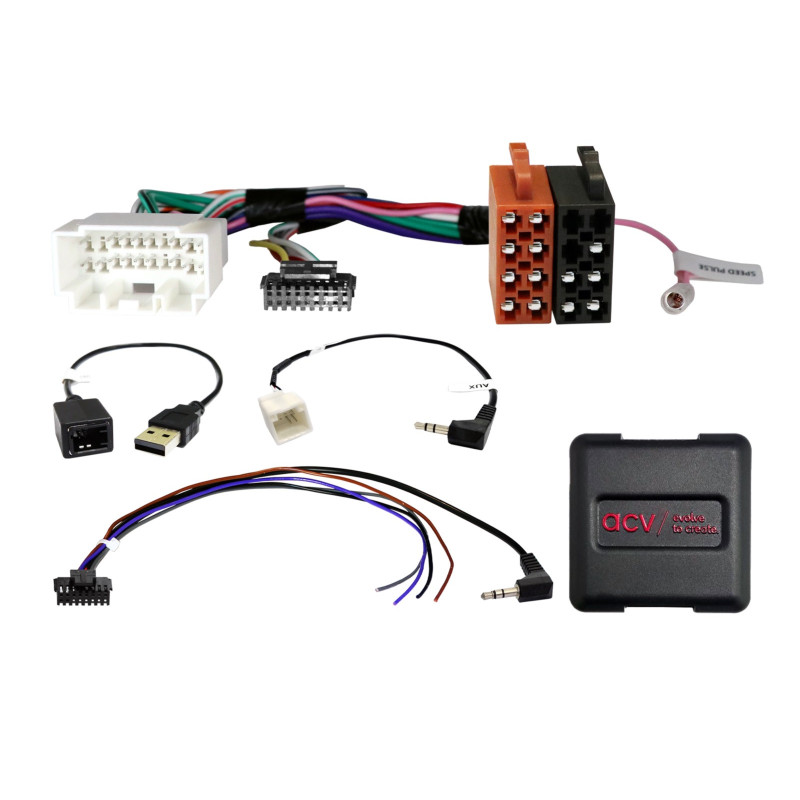

Suzuki Ignis/Jimny/Swift 20Pin Multilead USB/AUX Steering Wheel Adapter
Suzuki Ignis/Jimny/Swift 20Pin Multilead USB/AUX Steering Wheel Adapter
Guarantee
12 month
Delivery from Europe in
7 - 12
business days
Retain your original steering wheel remote control functions when replacing your factory radio with an aftermarket radio.
The adapter allows you to retain the operation of the steering wheel buttons with your new radio, ensuring comfort and safety of use.
Depending on the vehicle's equipment, range of features and software of the aftermarket device, some functions may be omitted or replaced by others.
Before purchasing, compare the adapter connectors with the wiring harness in your vehicle and check whether you have an original radio from the list of compatible models.
Connection type:analog
Connector:20-pin Suzuki connector
Connections:
OEM steering wheel controls → 3.5mm jack / loose cable
OEM AUX → 3.5mm jack
OEM USB → USB-A
Settings:DIP switches for aftermarket device manufacturer (see user manual)
Ignis (MF) - 01/2017 → 04/2021
Ignis (MF) - 04/2021 → 08/2024
Jimny (GJ) - 10/2018 → 09/2020
Jimny NFZ (GJ) - 04/2021 → 08/2024
Swift (AZ) - 04/2017 → 03/2024
⚠ Re-imported vehicles or vehicles with different software may be partially functionally incompatible.
Assembly instructions - shortCheck OEM radio functions and settings.
Remove the original radio with the power off.
Check all interface connections.
Set the DIP switches according to the device instructions.
Connect the wires according to the order in the radio manufacturer's instructions.
Finally, connect the power supply.
Configure and test your steering wheel remote control.
Installation recommended for trained personnel only.
Unauthorized changes to the wiring harness may void the warranty.